Snapisodes Download

Photo organiser for Android

Photos that sort themselves.

Say what you're shooting. Snapisodes files every new photo into an episode and keeps your spoken words with every photo.

Get it on Google Play

14 days of Pro free · no account · no ads

Snapisodes home screen with an ongoing episode
Holiday in Croatia
“Dinner by the sea, octopus”

Sound familiar?

Thousands of photos, no order

The gallery is one endless scroll. Finding last summer's trip means swiping for minutes.

What was that again?

A year later you look at a photo and no longer know where it was, who it was or why you took it.

Holidays lost among screenshots

Trip photos mixed with receipts, memes and WhatsApp pictures, never sorted into albums.

Snapisodes sorts your photos while you take them, not years later.

How it works

  1. 1

    Say what you're shooting

    Start an event, for example “Holiday in Croatia”; its photos become an episode. It ends when you like: at a set time or with one tap.

  2. 2

    Shoot as usual

    Use your phone's own camera with all its modes. Every new photo joins the episode by itself.

  3. 3

    A few words by voice

    Right after shooting, tap the microphone and say what's in the photo. The comment stays with the photo in the app; the photo file itself is never changed.

Everything your photos need

A gallery that knows your stories: episodes, comments, maps and more, all on your phone.

Episodes in advance

Say it once, photos file themselves

Start an event before you shoot and forget about sorting. Everything you photograph until it ends lands in its episode.

  • Ends at a set time or by hand
  • Quick end in 1, 2 or 5 hours, a day, or at a time you pick
  • Widget and quick settings tile to start and shoot
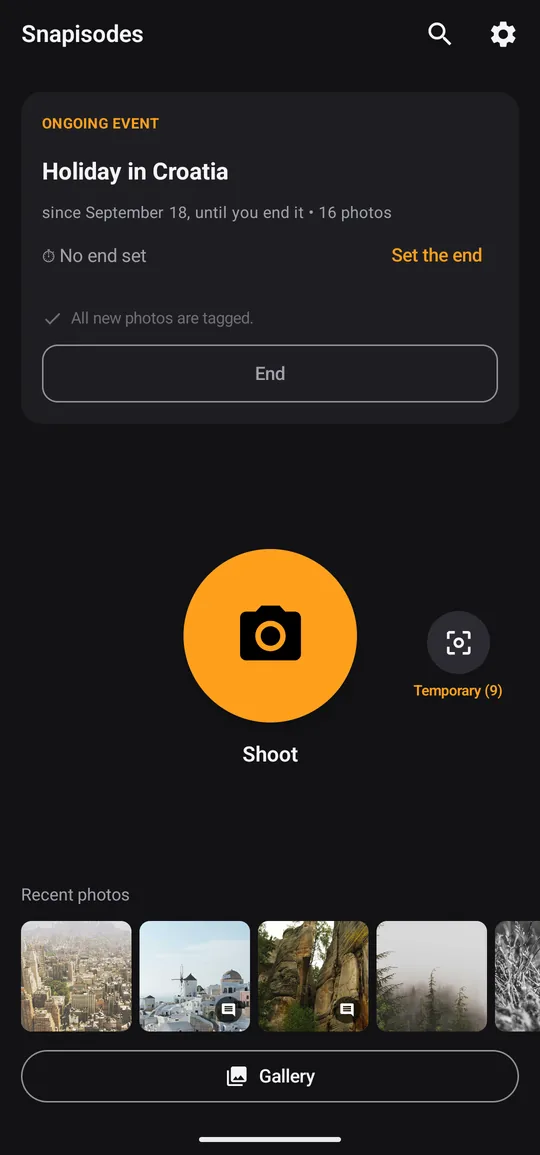
Snapisodes home screen with an ongoing episode and the camera button

Gallery

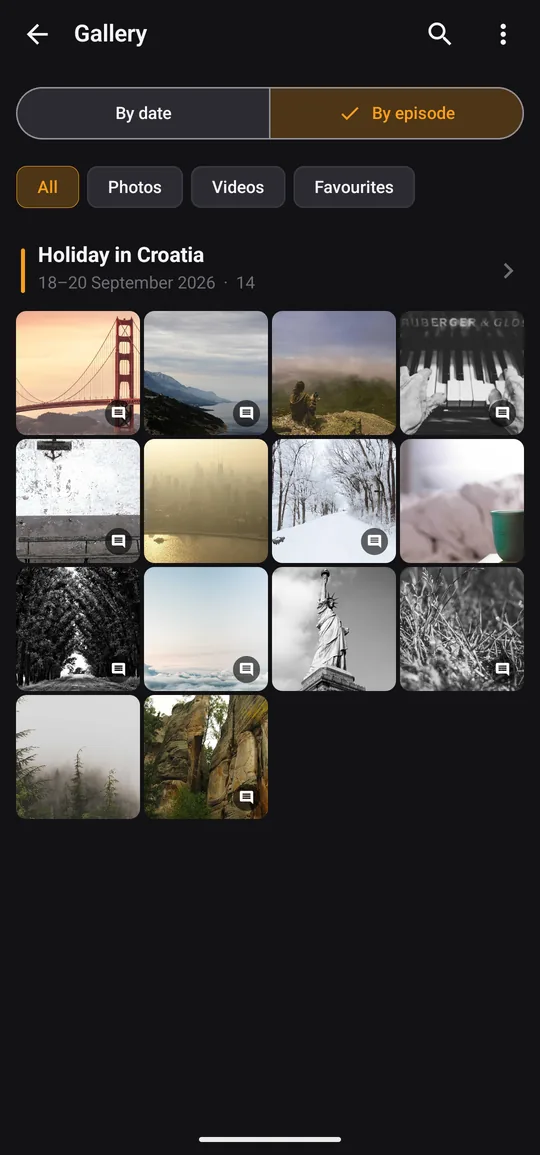
Your gallery by days or by episodes

All your photos and videos in one timeline. Switch between days and episodes with one tap.

  • File older photos into an episode afterwards, a day or a period at once
  • Rename and move episodes, merge them with Pro
  • Filters for photos, videos and favourites
Gallery switched to episodes, showing one episode with its photos

Comments

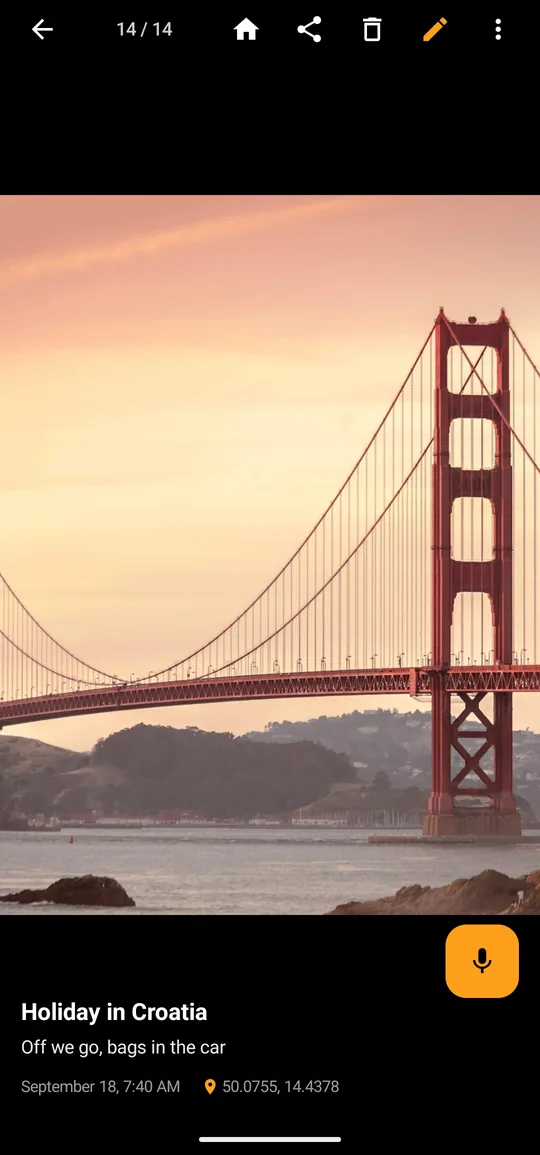
A comment by voice, kept with the photo

Say a few words and they stay with the photo in the app and its backups, also on a new phone. Your original photos and videos are never changed.

  • Typed or dictated, a few words are enough
  • Export as XMP files for Lightroom, digiKam or darktable
  • Photos and videos are never modified
A photo with its comment below it and a microphone button for dictating

Map and context

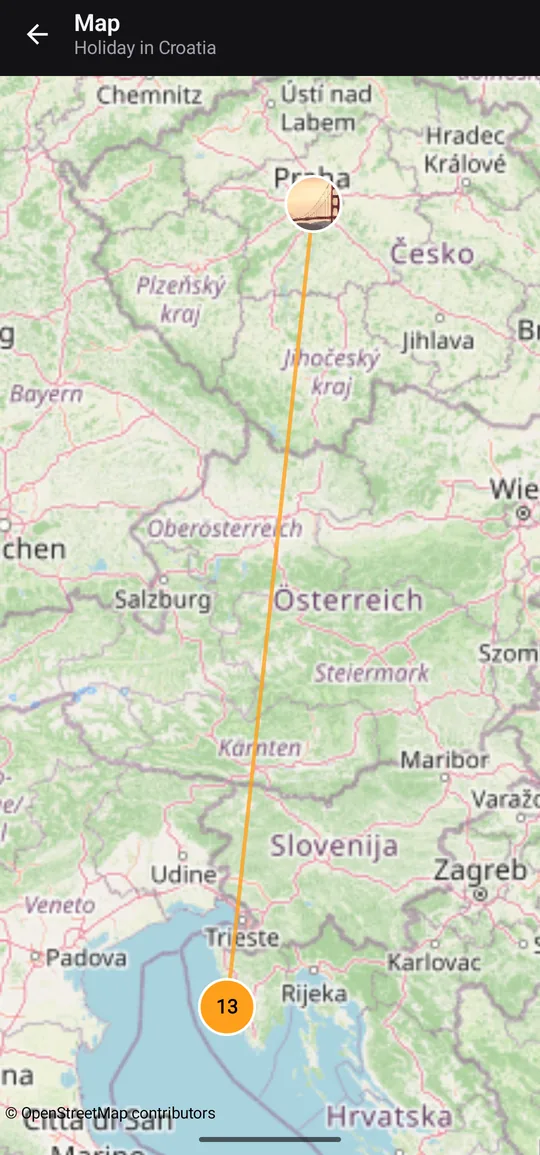
Every episode on a map

Your photos by GPS and the route of the trip, with the steps you walked if you like.

  • Map with the trail of the trip
  • Steps and distance (optional)
  • Place names suggested from the photo's location
Map of an episode with the route of the trip and a photo count

Stories and photobooks

The story of a trip, ready to share

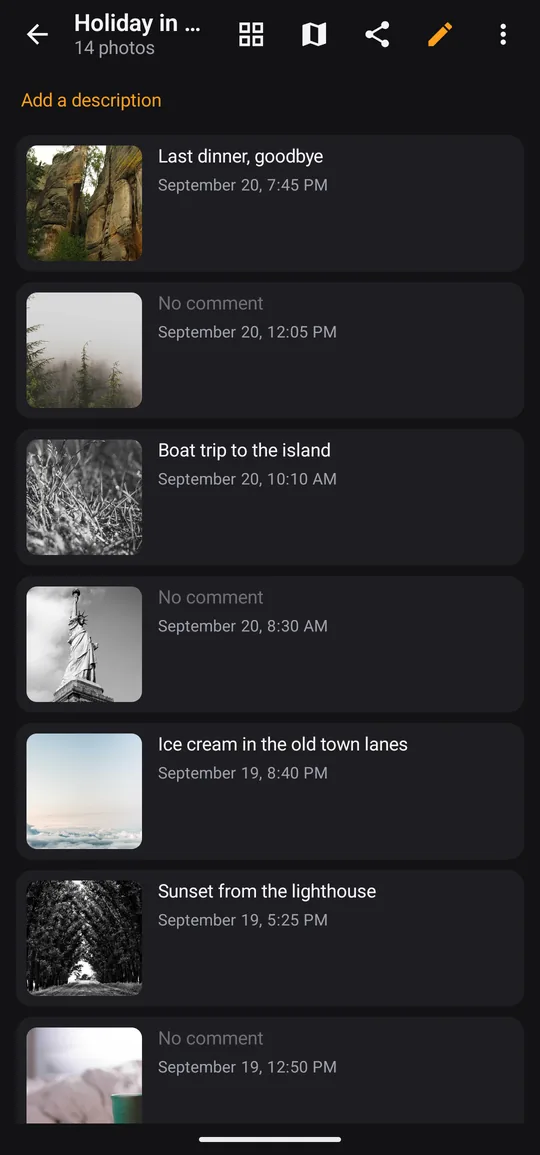
Send a whole episode with its comments in one tap, or turn it into a story or a photobook.

  • Story: map, route and photos with comments day by day
  • Photobook (Pro): print-ready PDF or a ZIP for photobook services
  • Share as an image for free, as a PDF with Pro
Photos of one episode in a list, each with its own comment

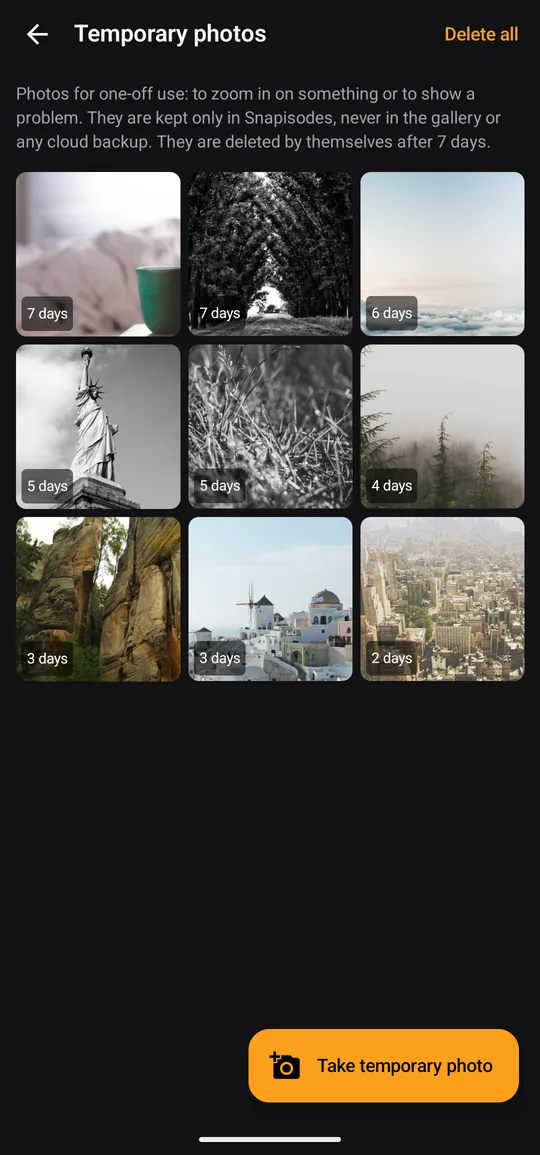
Temporary photos

Photos that don't clutter your gallery

Need to zoom in on something or show a problem to a repairman? A temporary photo goes only into the app, never into the gallery or the cloud, and deletes itself.

  • Small Temporary button next to the camera button
  • Zoom up to 8×, share, or save to the gallery after all
  • Deleted after 1, 7 or 30 days, or when you decide
Temporary photos screen: a grid of photos with the days left before they delete themselves

And much more

Search everything

By episode, comment or what's in the photo: dog, beach, food. Recognised on the phone; photos are never uploaded.

Automatic episodes Pro

Photos with GPS are grouped into trips and suggested as episodes named after the place.

Backup without an account

Episodes and comments go into your phone's Android backup and a file in Downloads.

Delete from OneDrive too Pro

Bad shots deleted in the app also leave your OneDrive camera backup, after a waiting period and into its recycle bin.

Import from Google Photos

Albums and captions from a Google Takeout export become episodes and comments. A phone folder can become an episode too.

Widget, tiles and shortcuts

Shoot into the episode, comment on the last photo or take a temporary photo straight from the home screen.

Episode description

A longer text for the whole episode: what happened and who was there. It shows in the story, the PDF and the shared text.

Edit without losing anything

Edit in your phone's editor, Galaxy AI included, and the episode and comment stay with the photo.

Your photos stay yours

Snapisodes has no server of its own. Your photos, episodes and comments stay on your phone and in your own backups.

  • No account and no sign-up
  • No ads, no tracking
  • Content recognition runs on the phone; no photos are uploaded
  • Online only for what you use: map tiles, dictation, place names, OneDrive, Google Play (purchase, recognition model)
Read the privacy policy →

Free, with Pro when you want more

Try everything for 14 days. Then keep using the free version, or unlock Pro once.

Free

0 €

  • The whole of Pro for the first 14 days
  • 3 new episodes a month
  • 20 newly commented photos a month, comments up to 20 characters
  • Gallery, map, search, temporary photos, widget and backup
  • Nothing you made ever disappears

One-time purchase

Pro

9.99 € once, no subscription (shown in your currency on Google Play)

  • Unlimited episodes and comments
  • Comments longer than 20 characters
  • Story of an episode as PDF
  • Photobook for printing
  • Merge episodes
  • Automatic episodes
  • Delete from OneDrive too

Made for

Travellers

Every trip as its own episode with a map, route and the story of each day.

Parents

Birthdays, first days at school, holidays: sorted, with a few words so you remember.

Tradespeople

“Novák job, until 3 pm”: photos of each job in one place, with notes.

Gardeners and makers

Follow how the garden or a project grows, season by season.

Collectors of moments

Concerts, hikes, dinners: every experience with its own story.

Questions and answers

Does Snapisodes change my photos?

No, never. Snapisodes does not change your original photos and videos in any format: no episode name, comment or other data is written into the files. Episodes, comments and descriptions are kept in the app's database on the phone and in its backups. If you rotate a photo, the app saves a rotated copy and moves the episode and comment to it; the original stays as it was.

What happens when I get a new phone?

On the old phone, tap Settings → Backup → Back up now and move your photos as usual (episodes and comments are matched to the original files by name and time). If you set up the new phone from your Google backup, Snapisodes brings episodes and comments back when it is installed. Otherwise copy the newest snapisodes-backup-….json (the one with the newest date and time in its name) from Downloads/Snapisodes/Backup to the new phone and choose Settings → Backup → Restore from file. Comments are not stored in your photo files, so restoring the Snapisodes backup is what brings them back; the exported .xmp files are meant for other programs (Lightroom, digiKam, darktable). A restore never deletes anything; the newer change wins. Pro comes back with the same Google account.

Does it work with Google Photos or OneDrive?

Yes. Snapisodes works alongside them and your photos keep uploading as before. The app never changes the files, so nothing is uploaded again; episodes and comments stay in the app and its backups, not in the uploaded copies. Albums and captions from a Google Takeout export can become episodes and comments. With Pro, bad shots you delete can also leave your OneDrive camera backup.

Is there a version for iPhone?

Not yet. Snapisodes is for Android 8 and newer.

What if I don't buy Pro?

For the first 14 days you get the whole of Pro. Then the free version stays, with no time limit: 3 new episodes and 20 newly commented photos a month, comments up to 20 characters; the counts start again on the 1st of each month. Adding photos to existing episodes, the gallery, map, search, sharing, temporary photos and backup stay free, and nothing you created disappears.

Do I need internet?

Mostly not. Only these go online: map tiles, dictation (your phone's speech service, offline if the phone can do it), place names and finding your home by address (only if you use them), deleting from OneDrive, and Google Play for buying or restoring Pro. Google Play services downloads the content-recognition model once. Everything else, including recognising photos, runs on the phone.

All questions and answers →

Start your first event today

14 days of Pro free, no account, no ads.

Get it on Google Play